Overview
This section describes the general work flows to install, set up and use the Enterprise Wallet. Unlike a Personal wallet, the Enterprise Wallet is a multi-user wallet. After the wallet is installed and initialized, the admin adds users to the wallet. Users registered in the business register (functionaries: CEO, CFO, ...) must request a natural person credential from the Bundesanzeiger to act in the registered function. Thereafter, the functionary can authorise other employees to act on their behalf (power of attorney). Any authorised employee can request Enterprise Credentials. Enterprise credentials are stored in the Enterprise Wallet. In order to present the credentials, the user has to create a presentation by applying an authentication proof. The rights are asserted by the assertion proof (signature rights of a functionary or power of attorney of an employee defined by one of the functionaries). Continue reading for a high-level overview or dive deeper into each section on the following pages:
- Create Enterprise Wallet
- Add User
- Enroll Natural Person
- Power of attorney
- Issue Organization Credential
- Present Organization Credential
High-level Flow
-
Create Enterprise Wallet: An administrator creates the Enterprise Wallet. In this process, the DID of the enterprise is created and the corresponding private key is stored in the key management system. Any user of the Enterprise Wallet can use this key to create an authentication proof and build a presentation.

-
Add User: The user requests a DID from the Enterprise Wallet. The Enterprise Wallet generates the DID and stores the private key into the key managmenent system. The DID represents the user acting as a Natural Person. Therefore, only the user who has requested the DID can use the private key to generate an authentication proof.

-
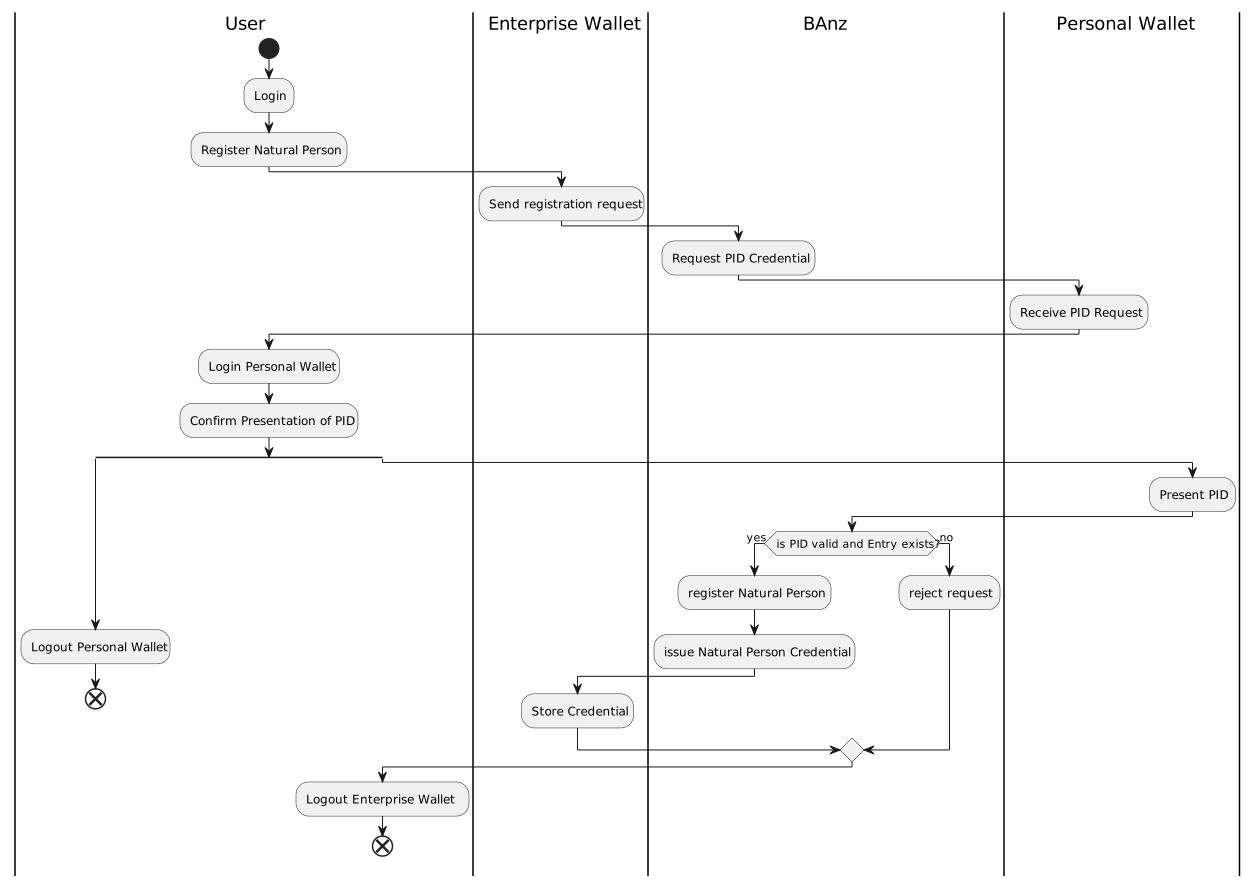
Enroll Natural Person: A user acting as Natural Person can register his newly generated DID at the Bundesanzeiger. Registration requires authentication of the requester, e.g. by presenting the PID stored in his Personal Wallet. The Bundesanzeiger searches for a matching entry in the transparency register. If the entry exists, the Bundesanzeiger registers the DID and issues a Natural Person Credential (NPC). The request is rejected if there is no matching entry .
-
Power of attorney: A user acting as Natural Person may authorise another user to act on his behalf within the limits of his rights. For example, the CEO may authorise a department head to sign contracts on his behalf up to a certain limit. In order to authorise another user, the authorising user issues a POA credential to the user who is authorised to act on behalf of the authorising user.

-
Issue Organization Credential: A Natural Person with signatory rights or power of attorney can use his Natural Person Credential or Power of Attorney Credential to request an Enterprise Credential from the Bundesanzeiger. If the requester is authrorized to request the Enterprise Credential on behalf of his company, the Bundesanzeiger issues the Enterprise Credential. A full KYC record is a list of credentials containing the legal entity certificate of the requesting enterprise and base data legal entity certifcates of all related legal entities (legal person and natural person). The link to a legal entity is created using the DID of the legal entity. If a natural person is not yet registered, a unique identifier is used instead, e.g.
urn:uuid:5042da0d-3675-4739-8c60-1c58390540a0.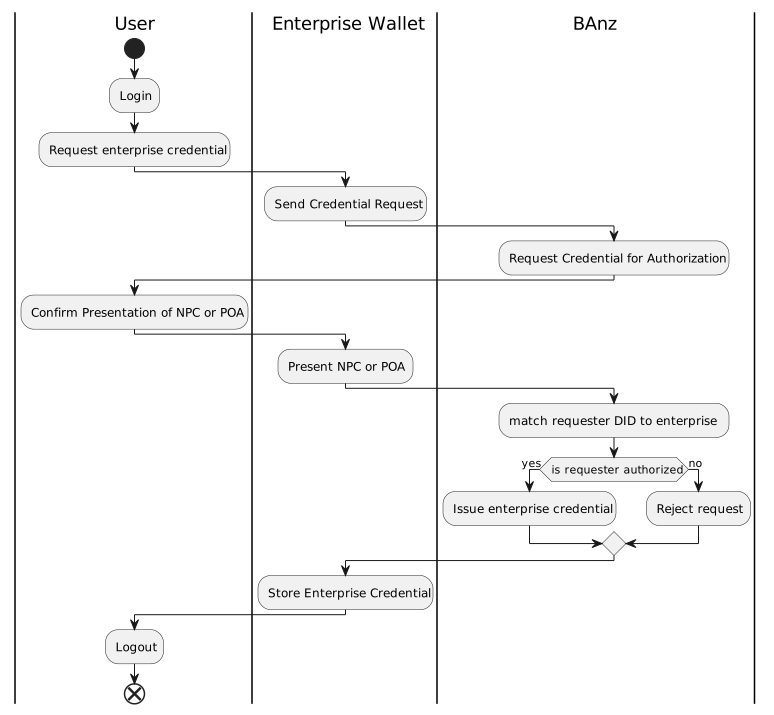
-
Afterwards, every user acting as Natural Person within the Enterprise Wallet can present the Enterprise Credentials to service providers to fulfill different use cases like: Open Bank Account.
